Integration Instructions
Download Integration Deployment Package
Place the SViewConverter integration deployment package in the specified disk directory according to the integrator's requirements.
Conversion License Application and Configuration
Both standalone licenses and floating licenses deployed on a server are supported.
1. License application method
Enter the ipconfig /all command in the DOS environment to obtain the MAC address of the local machine. You will receive a license file (with the extension .lic).
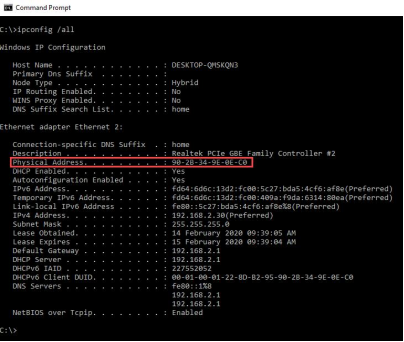
Figure 1: ipconfig /all output showing the MAC address
2. License deployment method
Standalone license — (1) Select "Install License" from the drop-down menu in the upper-right corner of the converter; (2) Select the applied license file and click OK. The license is installed successfully.
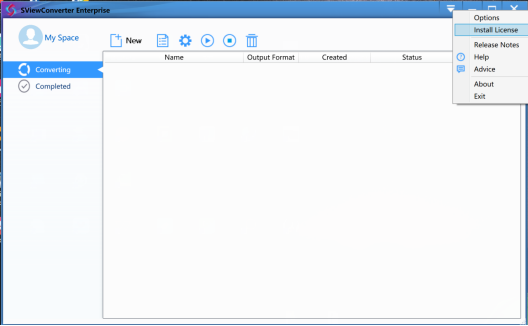
Figure 2: License installation interface
Change Interface Language
You can change the interface language of the software (Chinese and English are currently supported).
Click the drop-down arrow in the upper-right corner of the main interface and select "Options".
In the Options dialog box, select your preferred language from the Language drop-down list.
Click OK to apply the changes. No restart is required for the new language to take effect.
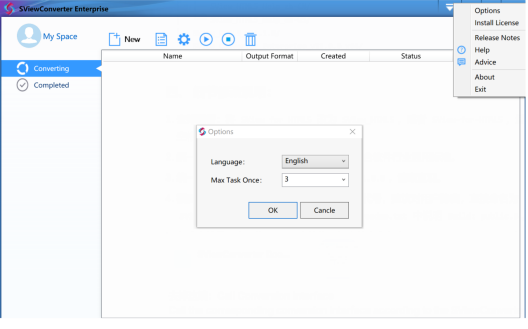
Figure 3: Language selection in the Options dialog



全部评论