Page Settings Group Guide
2026-07-09 15:23
1. Viewport
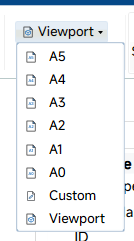
The Viewport button is used to configure the paper size for SVG page layout. After selecting a preset paper size, the system automatically updates the saved page width and height, and refreshes the page display rectangle in the viewport.
The dropdown menu provides the following paper size and layout options:
- A5: 148 × 210 mm
- A4: 210 × 297 mm
- A3: 297 × 420 mm
- A2: 420 × 594 mm
- A1: 594 × 841 mm
- A0: 841 × 1189 mm
- Custom: Applies the custom width and height values saved in the software configuration.
- Viewport: Reverts to the default page layout mode based on the current viewport size.
2. Landscape
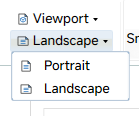
The Landscape button controls the page orientation. It switches between vertical and horizontal layout by swapping the current page width and height values.
The dropdown menu contains the following orientation modes:
- Portrait: Vertical page layout, with page height greater than width.
- Landscape: Horizontal page layout, with page width greater than height.






全部评论